IFTTT Pinterest Error Fixed: How to Solve ‘Invalid Request’ HTML Code Issues in 1 Minute
The Frustrating IFTTT Pinterest Error Everyone Faces
When automating your monetized blog, connecting WordPress to Pinterest via IFTTT is one of the first traffic strategies you implement.
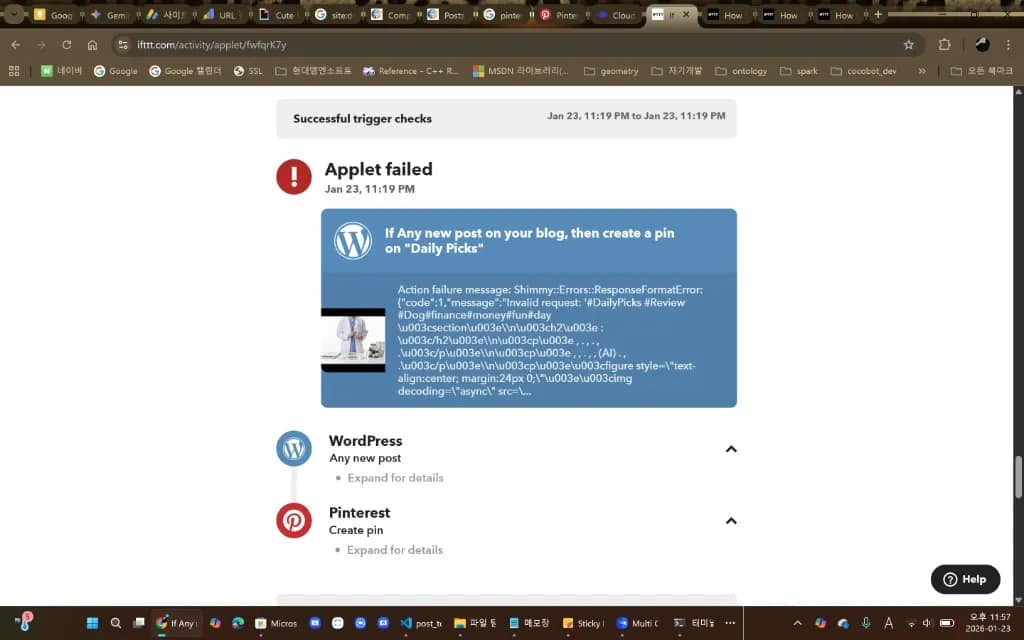
I excitedly finished my setup, only to see red error messages instead of successful pins. Have you encountered this cryptic ‘alien code’ error?
Action failure message:
Invalid request...<h2…
It looks like you broke the code, but actually this is a simple mistake that takes 1 minute to fix once you understand what’s happening.
Today I’ll share the solution to IFTTT Pinterest HTML tag errors and configuration tips to maximize click-through rates.
1️⃣ Root Cause: “Pinterest Hates HTML”
Check your IFTTT Applet Settings again. Did you put {{PostContent}} in the Description field?
We think “showing the full post content in Pinterest descriptions would be helpful, right?” But this creates two critical problems:
❌ Problem 1: HTML Tag Bomb
PostContent doesn’t just contain plain text—it includes all the web source code like <div...>, <img...>, and <section> tags.
Pinterest can’t parse this code, so it rejects your request with an Invalid request error, essentially saying “What is this? I can’t accept it!”
❌ Problem 2: Character Limit Bomb
Pinterest descriptions have a 500-character limit. Your full blog post (2000-3000 characters) exceeds this capacity.
💡 Key Point:
PostContentcontains ‘complete HTML code’ which Pinterest cannot accept!
2️⃣ Solution: Ingredient Diet
The fix is simple: instead of including the ‘entire post body,’ keep only the ‘essentials’.
✅ Follow These Steps (1 Minute Fix)
- Go to IFTTT website (or app) → Click your Applet → Click [Settings]
- Navigate to Action (Pinterest) settings section
- Delete the
{{PostContent}}box from the Description field - Replace with just
{{PostTitle}}and{{PostUrl}}
🏆 Recommended Golden Configuration
{{PostTitle}}
{{PostUrl}}
#YourBlogTopic #Keywords (manual entry)
After making these changes, click [Update], then press [Check now]. Like magic, the error disappears and you’ll see a “Success” message! 🎉
3️⃣ Expert Insight: Why This Strategy Makes Money
Beyond fixing technical errors, showing your full post content actually kills revenue.
Think from a Pinterest user’s perspective: if the entire blog post is already visible in the description, why would they click through to your blog? They’ve already read everything.
💰 Revenue Comparison
- Beginner Mistake: Show full content → Users read and scroll past → $0 revenue
- Expert Strategy: Show only compelling title + thumbnail → “What’s this about?” → Click to blog → Ad revenue generated 💵
This marketing principle is called ‘Curiosity Gap’. Thanks to this IFTTT error, you’ve actually learned a better monetization strategy!
💡 Bonus Tip: What About Old Posts?
IFTTT only triggers for ‘newly published posts.’ What about your existing content library?
Method 1: Chrome Extension (Recommended)
Install Pinterest Save Button and manually pin a few at a time. Safest and most reliable.
Method 2: IFTTT Workaround (Use Cautiously)
In WordPress admin, change post status from [Published] → [Draft], then back to [Published]. IFTTT thinks “Oh, new post!” and creates a pin.
⚠️ Warning: Doing too many at once risks spam detection and account suspension. Limit to 5-10 posts per day!
✅ Conclusion: Your Automation Pipeline Is Complete
Automation setup seems complex at first, but once configured, it becomes a ‘digital traffic machine’ working even while you sleep.
If you’ve solved this error today, your blog pipeline is complete. Now just focus on creating content!
Next Step: Install the Auto Featured Image plugin to complete automatic image configuration for a perfect automation system.
Core Keywords: IFTTT error, Pinterest Invalid request, PostContent error, HTML tag issue, WordPress automation, blog traffic, Pinterest integration, Description configuration, automation troubleshooting
🛠️ Technology Stack
AI Models
- Gemini 2.0 Flash Exp: Content generation (2500-3500 chars)
- Gemini 2.5 Flash Image: Automatic image generation
API Integration
- WordPress REST API v2: Post, media, category management
- Google Indexing API v3: Automatic Search Console indexing
Key Libraries
- Python Schedule: Automated scheduling
- python-dotenv: Environment variable management
- PyInstaller: EXE building
- google-genai: Official Gemini API SDK
💡 AI Tips
Leveraging ChatGPT, Gemini, and Claude
Utilize each AI model’s strengths when building AI blog automation:
- Gemini: Fast response and long context handling. Perfect for keyword expansion and content generation
- Claude: Accurate code generation and detailed explanations. Useful for complex logic implementation
- ChatGPT: Versatility and stability. Suitable for prototyping and idea validation
💡 Pro Tip: Build a pipeline that quickly generates drafts with Gemini, refines them with Claude, and finalizes with ChatGPT for the best quality.
📊 Results and Impact
Automation Level
- ✅ Keyword Selection: Automated (category rotation)
- ✅ Content Generation: Automated (Gemini AI)
- ✅ Image Generation: Automated (Gemini 2.5 Flash)
- ✅ Translation: Automated (Korean → English)
- ✅ Publishing: Automated (WordPress API)
- ✅ Indexing Request: Automated (Google Indexing API)
Quality Improvements
- Post Length: 2000 chars → 2500-3500 chars
- Keyword Pool: Fixed → Dynamic expansion
- Image Layout: Enhanced (figure tags, captions, styling)
- SEO: Natural keyword placement, commercial intent included
🚀 Future Plans
Short-term Improvements
- Keyword priority system (recent keyword weighting)
- Category-specific content templates
- Generated image caching
- A/B testing functionality
Long-term Roadmap
- Multi-language support expansion (Japanese, Chinese)
- Performance analytics dashboard
- Automatic CPC optimization
- Web UI management interface
📝 Conclusion
Today, we completed all core features of the AI blog automation system. From UTF-8 encoding resolution to dynamic keyword expansion, content quality enhancement, and EXE distribution, a perfect automation pipeline has been established.
Now, high-quality content is automatically generated and published multiple times daily according to the schedule. SEO effectiveness is maximized through automatic Google Search Console indexing requests.
Key Achievement: With a fully automated AI blog system, we can generate and publish 7+ high-quality posts daily.