The Mystery of Perfect Settings with Failed Results
The core of a monetized blog is traffic automation. I recently built an IFTTT system to automatically upload WordPress posts to Pinterest.
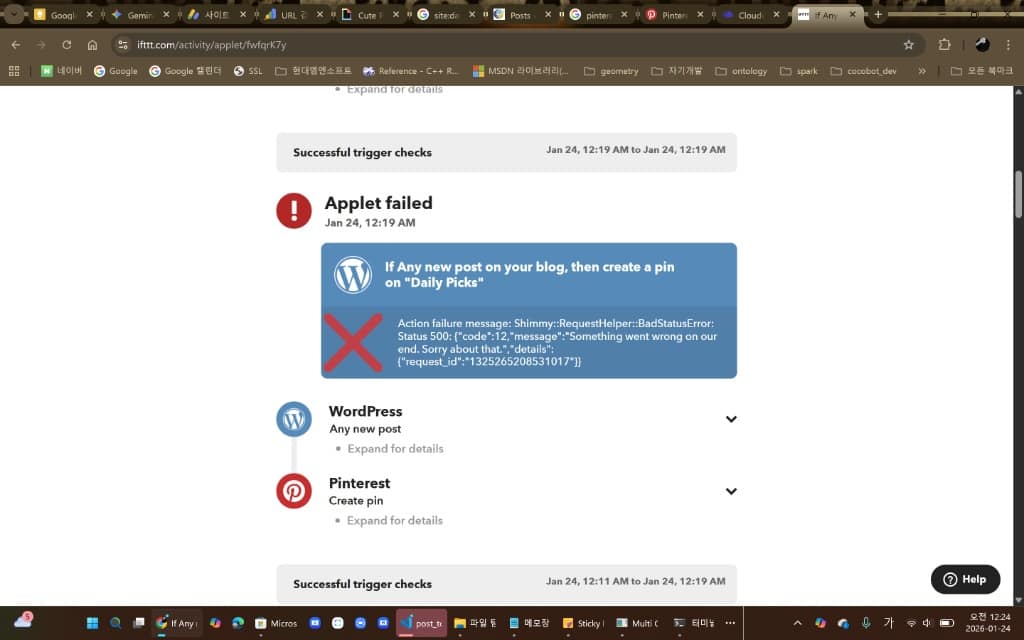
Despite completing the setup perfectly, pins weren’t being created and my logs showed bright red error messages.
Error Message:
Action failure message: Shimmy::RequestHelper::BadStatusError: Status 500... "Something went wrong on our end."
All my configuration values (Title, URL) were correct, so why was Pinterest throwing a server error (500)? Today I’ll share the unexpected cause I discovered after 10 minutes of troubleshooting and the solution.
1️⃣ The Problem: Perfect Setup, Zero Results
I configured IFTTT following best practices:
- Trigger: WordPress (Any new post)
- Action: Pinterest (Add Pin to board)
- Image Source:
PostFeaturedImageUrl(Featured Image)
But every time I pressed Check now, I got the devastating ‘Applet failed’ message with mysterious 500 error codes. I waited thinking it was a server issue, but nothing changed.
2️⃣ Root Cause Analysis: Over-Optimization Backfires (WebP)
The culprit was hiding in an unexpected place: the image conversion plugin I installed to improve site speed.
I was using ‘Convert Images to WebP on Upload’ to leverage Google’s recommended next-gen image format WebP. This plugin automatically converts all JPG uploads to WebP.
⚠️ The Conflict
Pinterest/IFTTT: “We want standard images like JPG or PNG. WebP is still unfamiliar (or causes processing errors).”
WordPress: “No, I’m giving you WebP no matter what.”
Pinterest servers couldn’t properly handle the WebP images and essentially responded with “I can’t process this (500 Error)”.
💡 Key Insight: WebP is a modern format, but it can cause compatibility issues with external platform integrations!
3️⃣ The Solution: “The End of Tuning Is Stock”
The fix is simple: revert your image format to standard (JPG/PNG) for automation compatibility.
✅ Step 1. Deactivate the Plugin
WordPress Admin → Plugins menu → Find Convert Images to WebP on Upload (or similar WebP conversion plugins) → Click [Deactivate].
✅ Step 2. Re-upload Images (Critical)
Deactivating the plugin doesn’t automatically convert existing images back to JPG. Go to the post that failed, delete the existing ‘Featured Image,’ and re-upload as JPG or PNG.
✅ Step 3. Re-run IFTTT
Return to the IFTTT app and press [Check now].
Like magic, the error vanishes and you’ll see a ‘Success’ message with beautiful pins appearing on Pinterest! 🎉
💡 Pro Tip: If you have dozens of existing images to convert, start with new posts using JPG/PNG. Update old posts gradually over time.
4️⃣ Expert Conclusion: Compatibility vs Optimization
Site speed matters, but external platform (SNS) compatibility is sometimes more critical.
Especially when automating image-based platforms like Pinterest, using the most compatible formats—JPG or PNG—saves your sanity.
💡 How to Get Both Speed and Compatibility
- Method 1: Upload JPG originals but use advanced plugins that serve WebP only to browsers (e.g., ShortPixel, Imagify)
- Method 2: Compress images before upload (use TinyPNG, etc.)
- Method 3: Handle WebP conversion at CDN level (Cloudflare, etc.)
⚠️ Warning: Don’t waste time like I did stuck in the ‘500 error’ trap. Check your image plugins right now!
💡 Additional Tip: Don’t Abandon WebP Completely
WebP isn’t inherently bad. It genuinely improves site speed. It just doesn’t play well with external integration tools like IFTTT.
🎯 Situational Strategy
- Automation is priority: Use JPG/PNG (100% compatibility)
- Speed is more important: Use WebP but manually upload to Pinterest
- Want both: Use conditional WebP plugins (serve WebP to visitors, JPG to APIs)
✅ Conclusion: Trial and Error Becomes Expertise
I spent 10 minutes figuring this out, but reading this, you can solve it in 1 minute.
The key to automation isn’t “perfect configuration” but “rapid problem-solving ability”.
If you’ve solved this error today, your Pinterest automation pipeline is complete. Now just wait for the traffic to roll in!
Next Step: Once Pinterest traffic starts flowing, analyze traffic sources with Google Analytics and optimize AdSense revenue.
Core Keywords: IFTTT 500 Error, Pinterest integration error, WebP image problem, Convert Images to WebP, WordPress automation, blog traffic, Pinterest automation, image compatibility, Status 500, troubleshooting
🛠️ Technology Stack
AI Models
- Gemini 2.0 Flash Exp: Content generation (2500-3500 chars)
- Gemini 2.5 Flash Image: Automatic image generation
API Integration
- WordPress REST API v2: Post, media, category management
- Google Indexing API v3: Automatic Search Console indexing
Key Libraries
- Python Schedule: Automated scheduling
- python-dotenv: Environment variable management
- PyInstaller: EXE building
- google-genai: Official Gemini API SDK
💡 AI Tips
Leveraging ChatGPT, Gemini, and Claude
Utilize each AI model’s strengths when building AI blog automation:
- Gemini: Fast response and long context handling. Perfect for keyword expansion and content generation
- Claude: Accurate code generation and detailed explanations. Useful for complex logic implementation
- ChatGPT: Versatility and stability. Suitable for prototyping and idea validation
💡 Pro Tip: Build a pipeline that quickly generates drafts with Gemini, refines them with Claude, and finalizes with ChatGPT for the best quality.
📊 Results and Impact
Automation Level
- ✅ Keyword Selection: Automated (category rotation)
- ✅ Content Generation: Automated (Gemini AI)
- ✅ Image Generation: Automated (Gemini 2.5 Flash)
- ✅ Translation: Automated (Korean → English)
- ✅ Publishing: Automated (WordPress API)
- ✅ Indexing Request: Automated (Google Indexing API)
Quality Improvements
- Post Length: 2000 chars → 2500-3500 chars
- Keyword Pool: Fixed → Dynamic expansion
- Image Layout: Enhanced (figure tags, captions, styling)
- SEO: Natural keyword placement, commercial intent included
🚀 Future Plans
Short-term Improvements
- Keyword priority system (recent keyword weighting)
- Category-specific content templates
- Generated image caching
- A/B testing functionality
Long-term Roadmap
- Multi-language support expansion (Japanese, Chinese)
- Performance analytics dashboard
- Automatic CPC optimization
- Web UI management interface
📝 Conclusion
Today, we completed all core features of the AI blog automation system. From UTF-8 encoding resolution to dynamic keyword expansion, content quality enhancement, and EXE distribution, a perfect automation pipeline has been established.
Now, high-quality content is automatically generated and published multiple times daily according to the schedule. SEO effectiveness is maximized through automatic Google Search Console indexing requests.
Key Achievement: With a fully automated AI blog system, we can generate and publish 7+ high-quality posts daily.